Therapy notes software for UK therapists
Secure session notes and process notes, organised by client, with version history and a full audit trail. Built for UK private practice.
Start 14-day free trialNo credit card required. From £10.99/month.
UK/EU hostedEncrypted at restAudit loggedBACP 7-year retention
Why therapy notes need purpose-built software
Most therapists start private practice writing notes in Word documents, Google Docs, or paper notebooks. It works — for a while. But as your caseload grows, these approaches start to create real risk. Word files on a shared drive have no access controls. Paper notes can be lost or read by anyone who opens the drawer. Neither keeps an audit trail of who accessed what, or when.
Under GDPR and the UK Data Protection Act 2018, you are the data controller for your clients' clinical records. That means you are responsible for keeping them secure, controlling who has access, and being able to demonstrate what happened if something goes wrong. A Word file on a laptop leaves gaps here — no access controls, no audit trail, and no easy way to produce a clean, structured record if a disclosure request lands on your desk.
And then there is the question of process notes. If your reflective therapeutic thinking lives in the same file as your factual session record, there is no structural barrier to accidental disclosure. In a Subject Access Request or legal proceeding, poorly separated notes can expose material that was never intended for the client to see.
Session notes and process notes — structured properly
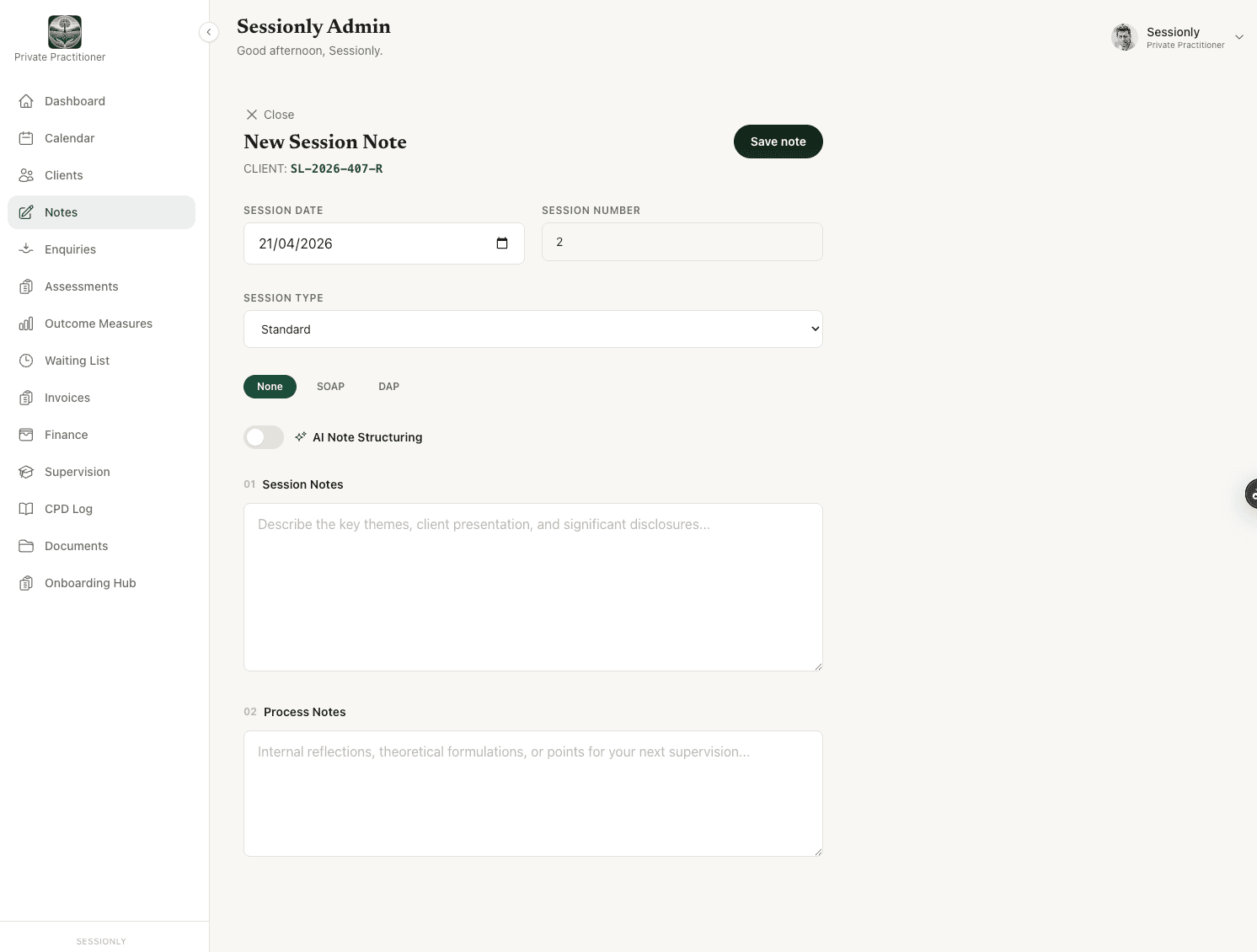
Sessionly gives every session two clearly separate fields, because session notes and process notes serve different purposes. Keeping them structurally separate helps you review and handle each category appropriately if a disclosure request arises; whether particular information must be disclosed depends on the circumstances and applicable data-protection law.
Session notes
The factual clinical record. What was discussed, key events, presenting issues, interventions used, and any actions agreed. Sessionly stores this separately from your reflective process notes, so you can review each category on its own when preparing a response to a disclosure request.
Process notes
Your private reflective thinking. Countertransference, clinical hypotheses, theoretical formulations, and material for your next supervision session. Sessionly keeps process notes structurally separate from the factual session record, so each category can be reviewed and handled appropriately when responding to a disclosure request. Whether particular information must be disclosed depends on the circumstances and applicable data-protection law.
In Sessionly, these fields sit on the same screen but are stored and treated as separate records. They can never be accidentally merged or exported together.
What counsellors need from counselling notes software
BACP-trained counsellors typically keep two kinds of writing about each client: a factual clinical record of the session, and private reflective thinking that supports supervision and formulation. Sessionly's counselling notes software puts these in clearly separate fields on the note screen, and stores them as separate records — so they can be reviewed and handled independently when responding to a disclosure request.
The rest of the platform is built to the same standard. UK English throughout; UK/EU data hosting in the London region; BACP-aligned 7-year retention defaults; passkey two-factor authentication on every login; a full audit trail on every view, edit, export and deletion. Every database query is scoped by row-level security policies, so each counsellor can only access their own clients' records.
Counsellors can choose SOAP, DAP or free-form on a per-session basis, and — where the organisation has enabled it — dictate free-form text and let AI structure it into the chosen format. Counselling notes sit alongside client records, outcome measures, calendar, invoicing and CPD in one place.
Templates that match how you work
Not every therapist writes notes the same way. Sessionly lets you choose your format on a per-session basis — so you can use structured templates when they help, and free-form when they do not.
SOAP
Subjective, Objective, Assessment, Plan. A structured format widely used in healthcare settings and supervision.
DAP
Data, Assessment, Plan. A lighter alternative to SOAP that focuses on the clinically relevant material.
Free-form
No template. Write your session record in whatever structure makes sense for you and your practice.
AI structuring
Dictate or type free-form text, then let AI organise it into SOAP or DAP format. Opt-in at organisation level and off by default.
Note governance built in
Good notes need more than a text field. They need a system that makes them trustworthy — complete, attributable and tamper-evident.
Version history on every edit
See exactly what changed, when, and by whom — including the original text before any edits were made.
Audit trail on every action
Every view, edit, export and deletion is logged with timestamp, user and IP address.
Agency mode: deletion requires approval
In agency mode, therapists cannot delete notes. Deletion requests go to a Leadership Team approval queue — with the request, the reason, and the decision all recorded.
Client reassignment preserves attribution
When a client moves between therapists, every note keeps its original author — nothing is lost or ambiguous.
Drafts auto-save locally
Your work is saved as you type. Close the browser mid-note and it will be there when you come back.
Secure by design
How clients appear in your notes is your choice
At signup, you decide how clients are identified throughout Sessionly: by name (recommended for most private practices) or by an anonymised code (e.g. 'JB23' in admin areas, separate anonymised codes in clinical notes for stronger separation). Both options keep your data encrypted and audit-logged. The choice is set during onboarding and can't be changed afterwards.
Passkey 2FA
Every login is protected by passkey two-factor authentication, with TOTP as a fallback. SMS deliberately excluded per NCSC guidance.
Device trust & re-auth
30-day device trust cookie. Sensitive actions require re-authentication. Inactive sessions lock automatically.
UK/EU hosted
All client records and clinical data are stored on UK/EU servers in the London region.
Row-level security
Every database query is scoped by row-level security policies. Each therapist can only access their own clients' records.
Encrypted at rest
Client names are AES-256 encrypted. All data is encrypted at rest and in transit.
Notes that sit inside your full practice
Session notes are one part of running a therapy practice. Sessionly connects them to everything else — so you are not switching between separate tools for notes, scheduling, invoicing and outcome measures.
Outcome measures →
PHQ-9, GAD-7, CORE-10, CORE-OM, YP-CORE, DES-II, WSAS and Goal-Based Outcomes — scored automatically alongside your session records.
Calendar & self-booking →
Weekly diary with recurring appointments, colour-coded session types, and secure client self-booking.
Invoicing & finance →
Auto-generate invoices from your calendar. Track expenses by HMRC category. Export for self-assessment.
Software for agencies →
Leadership dashboard, therapist management, two-code governance, and note deletion approval queues.
Practice management overview →
See how notes fit into the full Sessionly platform — clients, calendar, invoices, finance, CPD and more.
From £10.99/month. Everything included.
Session notes, process notes, SOAP/DAP templates, AI structuring, version history, audit trail — plus your calendar, invoicing, finance tracking, CPD logging, outcome measures and more. One price. No add-ons.
See full pricing →What is therapy notes software?
Therapy notes software is a secure system for writing, storing and managing client session notes and clinical records, replacing scattered Word documents or paper-based methods. Sessionly's notes feature is built for UK counsellors and therapists: it separates session notes (the clinical record) from process notes (private reflections), with audit trails, version history, and pseudonymised storage via a two-code system.
Frequently asked questions
Are session notes different from process notes?
Yes. Session notes are the factual clinical record — what was discussed, key events, presenting issues and any interventions. Process notes are your private reflective thinking — countertransference, clinical hypotheses, and material for supervision. In Sessionly, these live in clearly separate fields so they can never be accidentally disclosed together.
Is Sessionly suitable for counselling notes?
Yes. Sessionly is built for UK counsellors, psychotherapists and counselling agencies. Notes are organised as counselling notes should be — session notes (the factual clinical record) and process notes (your private reflective thinking) sit in clearly separate fields, with BACP-aligned 7-year retention defaults, UK/EU hosting in the London region, passkey two-factor authentication, and a full audit trail on every action.
Can I import my existing notes?
Sessionly does not currently offer a bulk-import tool. Most therapists start using Sessionly for new sessions and keep their existing records wherever they are. If you need to migrate a large volume of historical notes, get in touch and we can discuss options.
Who can see my notes?
Only you. If you chose anonymised codes at signup, notes are accessible via a system-generated code — never the client's name or admin record code. In agencies, the Leadership Team can view notes for governance purposes, but every access is recorded in a full audit trail. No one else — including Sessionly staff — can read your clinical records.
Does Sessionly support SOAP and DAP formats?
Yes. You can choose SOAP (Subjective, Objective, Assessment, Plan), DAP (Data, Assessment, Plan) or free-form standard notes for each session. You can also dictate free-form text and let AI structure it into SOAP or DAP format automatically.
How secure are my notes?
Notes are encrypted at rest and in transit, hosted on UK/EU servers in the London region, and protected by passkey two-factor authentication on every login. Row-level security at the database layer ensures that each therapist can only access their own clients' records. Every view, edit and export is recorded in a full audit trail.
Can my supervisor see my notes?
Not directly. Sessionly is designed so that you bring relevant material to supervision yourself — your process notes are there to support that preparation. In agency mode, the Leadership Team has governance-level access with full audit logging, but peer therapists and external supervisors do not have access to your notes.
What happens to my notes if I leave Sessionly?
If you cancel, your data remains accessible in read-only mode until the end of your billing period. You can request a full data export at any time. Sessionly follows BACP guidance on 7-year record retention — your notes are never deleted prematurely.
Do I have to use anonymous codes for client notes?
No. At signup you choose whether clients appear by name (the default and most common choice) or by anonymised code throughout Sessionly. Either way, names are encrypted at rest and access is audit-logged.
Start your 14-day free trial
No credit card required. Set up in under 5 minutes.
Start your free trial